Shopify orders placed and paid on AliExpress automatically
Auto-place orders · PayPal on AliExpress · Pro and Business
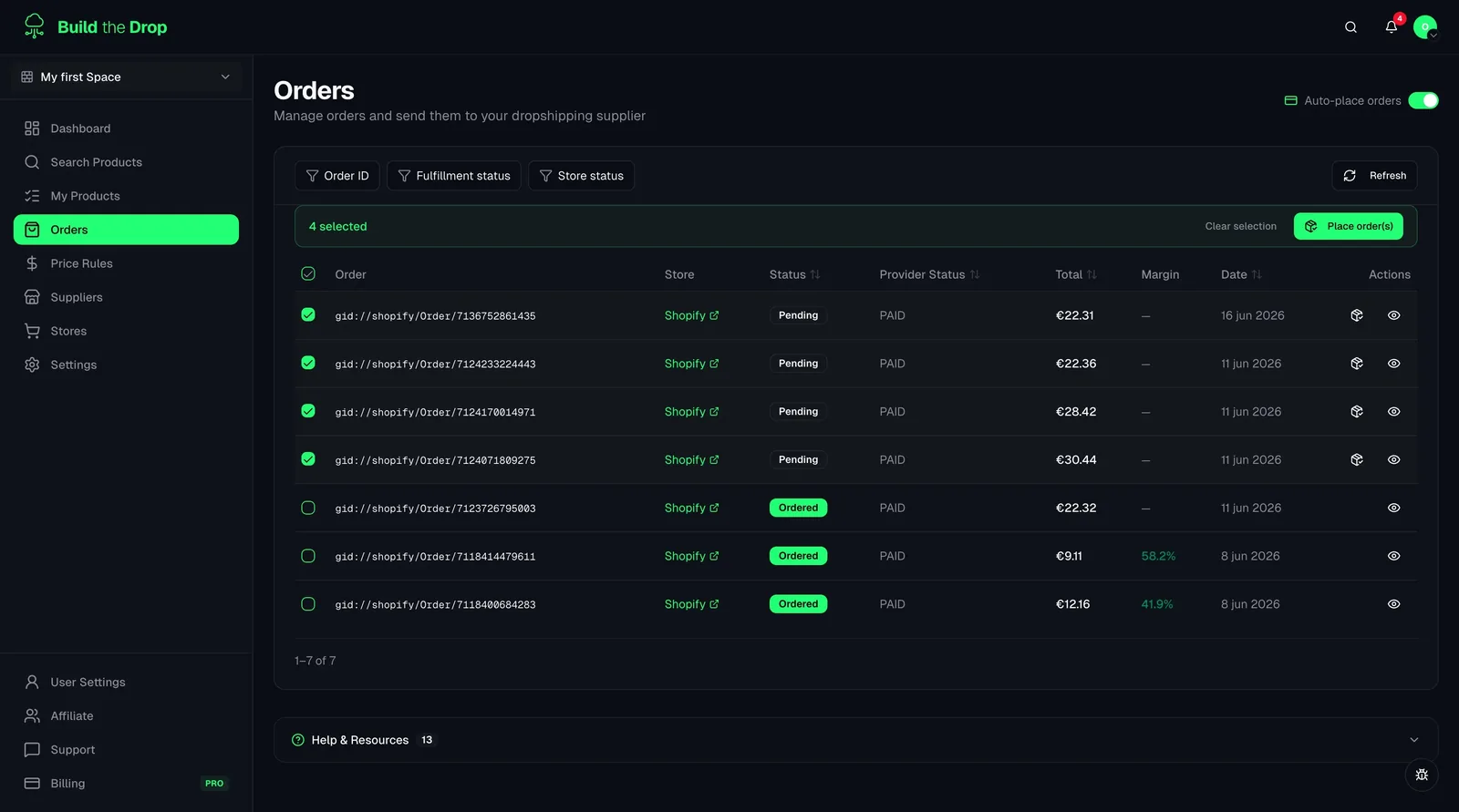
When a customer buys in your Shopify store, Build the Drop sends the order to AliExpress and asks AliExpress to charge the payment method you linked to your own buyer account. No copying addresses, no paying orders one by one.
Available from the Pro plan
0 clicks
per order once auto-pay is active
PayPal
linked on your own AliExpress account
Pro+
available on Pro and Business plans
Why paying AliExpress orders by hand slows your store down
In a typical AliExpress dropshipping workflow, every Shopify sale creates a small manual task: open the order, find the supplier product, pick the right variant, copy the shipping address and then pay. Many dropshipping tools automate the first steps but still leave the payment for you to confirm. With a few orders a day that is tolerable. With dozens, it becomes a daily chore, and any delay in paying is a delay in shipping to your customer.
Build the Drop closes that last gap. When an order arrives from Shopify, it is matched to the imported AliExpress product and variant, placed on AliExpress with the customer's address, and sent with an instruction to pay automatically. AliExpress then charges the payment method linked to your own buyer account. Build the Drop checks your auto-pay status directly with AliExpress and shows it on the supplier card, so you know whether new orders will be paid or will wait for you.
Auto-pay is available on the Pro and Business plans. It needs three things: a Pro or Business plan, 'Auto-place orders' switched on in the space settings, and PayPal linked as a payment method on your AliExpress account. On Free and Starter you can still fulfil every order from the Orders page with one 'Place order' click; you just confirm each one yourself.
What you get with AliExpress Auto-Pay
All the tools you need, built into your dropshipping dashboard.
Orders placed and paid without you
New Shopify orders are matched to the imported AliExpress product and variant, sent to AliExpress and paid automatically. You only step in when something needs your attention.
Your account, your payment method
Payment happens on your own AliExpress buyer account using the PayPal you linked there. Build the Drop never stores your card or PayPal credentials.
Auto-pay status at a glance
The AliExpress supplier card shows whether auto-pay is active. One 'Refresh status' click asks AliExpress for the current state, so you always know which side is missing.
Opt-in per space
Auto-place orders is a switch in each space's settings. Keep it on for a store that runs on autopilot and off for one where you prefer to review every order.
How it works
Use a Pro or Business plan
Auto-pay is included in Pro and Business. On Free and Starter, orders are placed manually with a 'Place order' button.
Turn on 'Auto-place orders'
Open the space settings and switch on 'Auto-place orders' in the Suppliers section. Without this opt-in no order is sent automatically.
Link PayPal on AliExpress
Log in to your AliExpress buyer account and add PayPal as a payment method. This one-time step happens on AliExpress, not in Build the Drop.
Refresh the status and sell
Click 'Refresh status' on the AliExpress supplier card. When it shows 'Auto-pay active', new orders are placed and paid automatically.
Who benefits from AliExpress auto-pay
Orders arriving while you sleep
Your store sells to a different time zone and orders land at night. With auto-pay active they are placed and paid on AliExpress before you wake up, instead of waiting hours in a queue.
A product that suddenly takes off
An ad starts working and daily orders jump. Instead of spending your day paying orders one at a time, they flow to AliExpress automatically and you focus on the campaign and customer service.
Several stores, different rules
You run a proven store on autopilot with auto-place on, and a new test store where you prefer to review each order manually. Because the switch is per space, both setups live side by side.
Related guides
How to Enable AliExpress Auto-Pay
Step-by-step: upgrade your plan, enable Auto-place orders in space settings, link PayPal on AliExpress, and refresh the status to start auto-paying new orders.
Read guideHow AliExpress Orders Are Fulfilled Through Build the Drop
Step-by-step walkthrough of what happens between a customer placing an order in your Shopify store and AliExpress shipping it out — including the role of auto-place, manual placement, and the order status timeline.
Read guideThe 5 Best DSers Alternatives to Manage AliExpress Orders
Analyze the best alternatives to DSers in 2026: Build the Drop, Zendrop, Spocket and other options. What features they add and how to migrate without losing your connected products.
Read guideFrequently asked questions
Stop paying AliExpress orders one by one
Connect Shopify and AliExpress, switch on Auto-place orders and let new orders be placed and paid for you.